


Calculate Principal Components
To calculate the principal components of a set of variables in your data, go to the Methods menu and select Principal Components from the drop down menu.
PCA models
The first tab in the Task Manager for Principal Component Analysis is the PCA models tab. Choose the geography with which you would like to work and click the Create button to begin your analysis. The following dialog will appear.
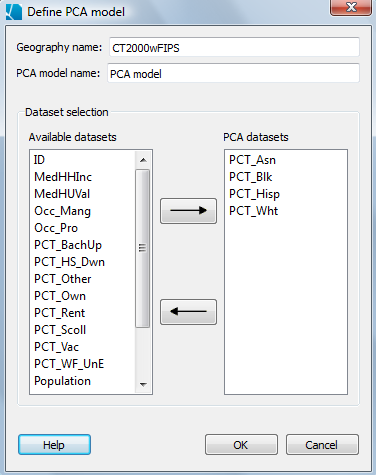
You can change the name of your PCA model in the PCA model name field, otherwise the default name "PCA model" will be used. If you plan on creating multiple PCA models, it will be helpful to name them differently.
All the numeric datasets which are included in your geography will appear in the left panel of the dialog. To select a dataset to be included in your principal component analysis, choose a dataset and select the arrow pointing to the right. You can also double click on a dataset to shift it to the right column where the PCA variables are listed. If you decide you would like to remove a dataset from the PCA analysis, click on the dataset so it is highlighted and then click the left-facing arrow. The dataset should return to the Available variables panel. You may also double click on a dataset in the right panel to return it to the left panel.
Once you have selected all the datasets you would like to include in your PC analysis, click the OK button.
You will return to the PCA models tab of the Task Manager. To create a new model, click the Create button. To modify a current model, select the model name and click the Modify button. To delete a model from this window, select the model and click the Delete button.
PCA settings
In this tab, you can set the start and end times for your analysis. SpaceStat will calculate the principal components for your model for each unique time slice. If your data does not change during the time period you selected, you will have a single PC analysis.
You may also name your Output folder in this tab. This will be helpful if you have more than one analysis that you are working with.
Run
The Run tab summaries the choices made earlier in the Task Manager. If everything looks correct, click the Run button.